


Vizio is a well-known name in consumer electronics – but not for computers. The company only got into the computer business within the past year and is jumping right into one of the most popular segments of the market: Ultrabooks. Dubbed the Thin and Light, Vizio’s new 14-inch CT 14-A4 model is clearly hoping to stand out from the crowd.
The $849 price will turn some heads, but can the Thin and Light hold our interest? Read our full review to find out.
Full-on Monet
Vizio definitely has the Ultrabook aesthetic down. You’ve got an aluminum body that tapers down to razor-thin edges, a feathery weight, wide keys, and a buttonless clickpad. If it were made to sit on a shelf, the Thin and Light would be a good example of beautiful design. Of course, laptops are not made to sit on shelves.That tapered edge may look good, but it feels terrible. The edges cut into our palms and wrists as we typed, making it uncomfortable to use the laptop. Except for the soft-touch bottom, there’s an industrial feel that doesn’t make the laptop very inviting to touch, and this discomfort continues on the keyboard.
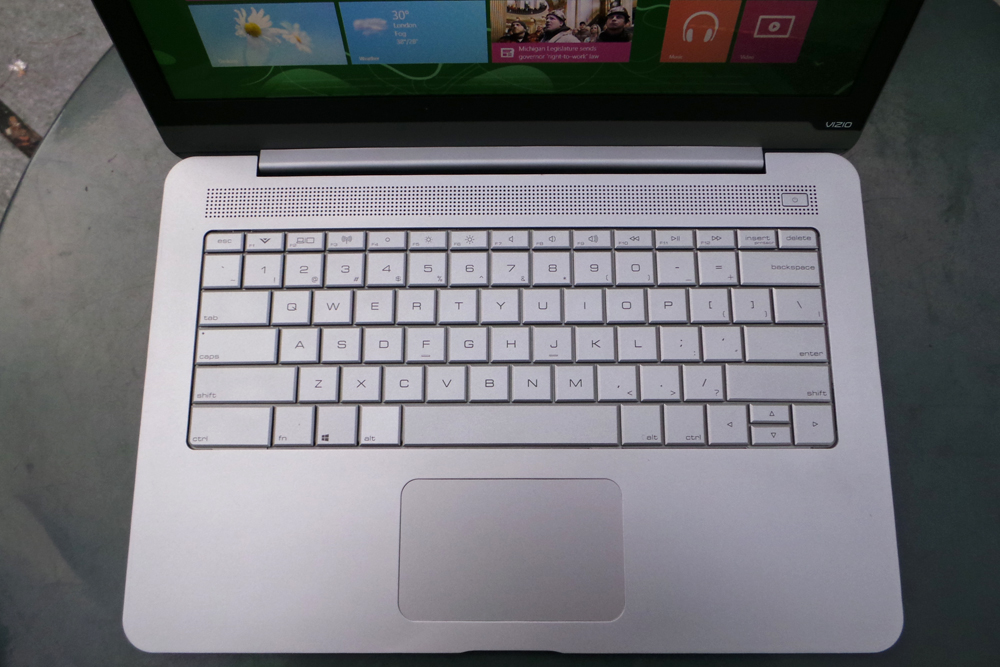 Though the keys themselves are big, we noticed a considerably larger amount of dropped letters than usual when typing on the Vizio. Again, the typing experience is pretty uncomfortable, especially when we had to type harder to avoid dropping letters. The layout is also a bit odd. The Ctrl key is wider than it needs to be, which pushes the Alt key farther over and shortens the Space bar. This made executing keyboard shortcuts more difficult.
Windows 8 without a touchscreen? Send help
The Vizio Thin and Light is a Windows 8 machine, but the 14-inch display is not touch-enabled. Touch isn’t a requirement for the OS, and it often doesn’t add as many benefits as headaches. However, if you don’t have a touchscreen, you should at least have a good multi-touch trackpad. Unfortunately, the Vizio falls short here as well.To start, the touchpad is a little small for a system this size. It has a friction-free surface and is fine for basic navigation and clicking. However, executing essential Windows 8 gestures is a frustrating experience. There were only a few times that we successfully brought up the Windows charms and other panels accessed by swipe from the touchpad edge. Most of the time, they didn’t register at all.
If the touchpad doesn’t work, you can access the functions by moving the mouse to hotspots in the corners, but that’s the least efficient and least intuitive way to navigate Windows 8. It also shouldn’t be necessary.
Bloatware gets the boot
We have to give Vizio props for the lack of bloatware. You won’t find any annoying bloatware or pre-loaded programs causing windows to pop up in your face with this laptop. Vizio gives you Windows pure and simple, which is pretty rare.A decent display
We’re glad to see a 1600 x 900 pixel resolution on the 14-inch screen instead of the usual 1366 x 768. The display’s rich colors and deep blacks make video, Web pages, and images look great when you’re in the sweet spot. Viewing angles aren’t very wide, so positioning the screen at the right angle proved to be very important.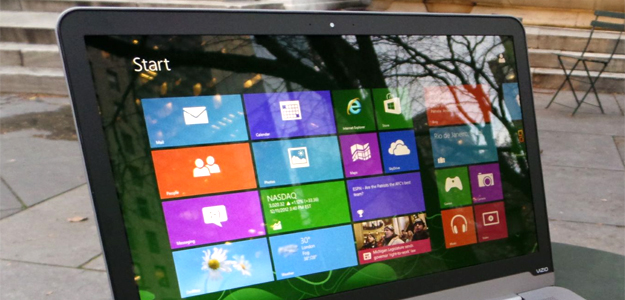 Because of the limited viewing angle, the Vizio doesn’t make a great multimedia machine. Plus, despite being positioned at the top of the deck, the speakers don’t produce very voluminous audio. The sound quality is tinny, which is expected from Ultrabooks, and you’ll want headphones or external speakers if there’s any background noise.
One hot body
During our use, the Vizio got noticeably hot on the bottom whenever we pushed the machine. Multitasking made the laptop somewhat toasty, but playing videos, games, and performing benchmark tests increased the heat to uncomfortable levels. The top of the Ultrabook can also get hot, especially toward the top of the deck.With such high temperatures, the fan is certainly needed. When it kicks on, the sound is clearly audible in quiet rooms. That being said, the fan noise isn’t too noticeable unless you’re pushing the notebook hard.
Portable and Power Hungry
For a 14-inch system, at 3.4 pounds, the Vizio is pretty light. It has a footprint small enough to fit many 13-inch laptop bags, making it a great size for travel. However, the value of an ultraportable like this goes down if battery life isn’t up to par – and that’s unfortunately the case here.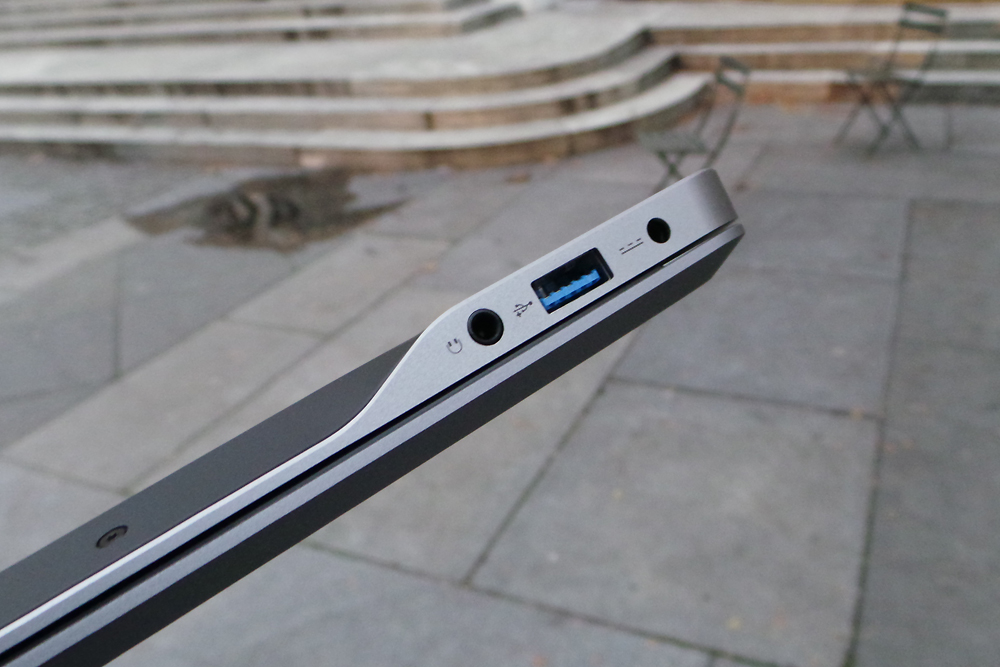 During normal use – which included multitasking with Chrome and Firefox, using Microsoft Word, and streaming video and music – the Vizio only lasted around 4 hours before needing to be plugged in. In the Peacekeeper benchmark test, the battery died after just over 3 hours, which isn’t nearly enough battery life for an Ultrabook – even at this size. So, don’t leave the A/C adapter at home.
Average performance
The Vizio Thin and Light is powered by a 1.7-GHz Intel Core i5-3317Un. This type of ultra-low voltage processor is standard on many Ultrabooks. The notebook also has 4GB of RAM and a 128GB SSD backing it up. The Thin and Light handled everyday tasks well, opening files and apps quickly and keeping up with intense multitasking.In benchmarks, it turned in average scores. SiSoft Sandra’s Processor Arithmetic benchmark reached 30.26 GOPS while 7-Zip turned in a combined score of 6,931 MIPS. The Vizio scored 4,682 in PCMark 7. None of these are stellar results, but are within the average range and are good for an Ultrabook of this price.
As with most other Ultrabooks, the graphics performance is good enough for casual gaming and HD video, but that’s about it. 3DMark 06 and 3DMark 11 returned respective scores of 5,253 and 616, which means if you’re looking for a good gaming laptop with topnotch graphics, you’ll want to look elsewhere.
Conclusion
The $849 Thin and Light is Vizio’s freshman effort in the Ultrabook category, and it’s clear that the company has been paying attention to what people want from these machines. However, the execution doesn’t quite live up to the ideal. You have a computer that looks good but feels uncomfortable, promises long battery life but doesn’t deliver, and runs an OS made for touch interaction with a clickpad that seems to dislike being touched.That’s too bad, because there are some positive aspects to the Thin and Light, and it’s the kind of Ultrabook you want to like when you see it. In the next generation, we hope that Vizio pays a little more attention to how the laptop feels.
Highs
- Attractive design
- Light for a system this size
- No bloatware
Lows
- Uncomfortable design
- Difficult keyboard
- Not enough ports
- Touchpad doesn’t make Windows 8 easy to use
- Short battery life


0 comments:
Post a Comment